Getting started with email delivery time optimization
Email delivery time optimization
- Define delivery time window: If you have not already, you may restrict the available options for sending times by informing your Customer Success contact
- Request it to be turned on: At your request, the feature is turned on in the background. There is nothing else that you need to do.
How it works: As an initial step with lower volumes, delivery time is optimized across all emails in order to create enough volume for the AI to have an impact. Over time, individual emails with enough volume are handled separately.
All delivery times are restricted to whatever time window is available for the rest of the day. The point in time where the decision needs to be made then removes non-existent options and ensures delivery on the same day, instead of being postponed.
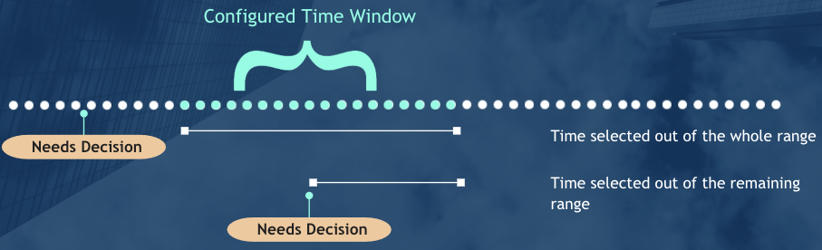
Delivery times are selected based upon the details that are known about the person.
Key enhancements:
- Allows both low- and high-volume communications to be optimized
- Allows you to start with no experience and limited data set
- As you grow, the AI splits apart key communications that are sent more often for you
- You can add data later on once you are running
- Dynamically changing time window based upon your configuration