How to Configure and Run a Communication Campaign
Going beyond your standard dunning strategy can prove beneficial in certain scenarios. There are instances where sending an SMS to a group of clients in arrears or an email reminder about an upcoming price adjustment can be advantageous. Whether your client data is already within receeve or not, we provide a range of tools to facilitate the implementation of generic ad-hoc communication templates alongside your existing communication strategy.
Tools Required & Prerequisites
To set up and execute a one-time campaign, you will require access to the following tools:
- Authorization to the strategy builder
- A method to upload claims through a script, file, or API
- If your target audience is already in receeve, you must have a means to identify or segment them (we recommend using a unique portfolio reference per campaign)
- A method to analyze campaign results and desired metrics (e.g., delivery rates, click rates, etc.)
Step 1: Develop Your Campaign
Create the desired messaging in the form of content templates using your preferred content tools within receeve. Utilize the full capabilities of the tool for personalization and templating with placeholders.
This could range from a simple SMS to a more intricate campaign involving multiple messages and responses to specific events like deliverability. We recommend setting up a campaign as a distinct strategy block.
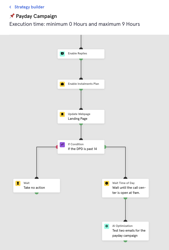
Example 1 - A campaign with built-in segmentation:
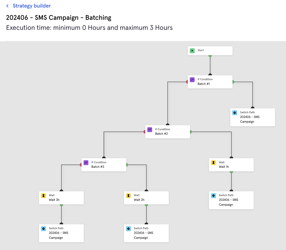
Example 2 - Campaign Batching
You can design your strategy using delayed delivery times in batches in order to minimize the chances of overflooding your call center with debtor replies
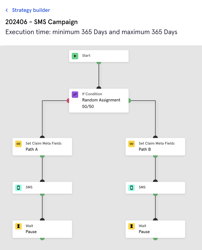
It's worth noting that a communication template can also be used for A/B Testing. Refer to our A/B testing guide for more information on these tests.
Example 3 - A campaign with an integrated A/B Test
Step 2: Execute the Campaign
There are generally two approaches to executing your campaign, depending on whether your target audience is already in receeve or not. A combination of both options is also feasible:
Option 1: Target Audience Not in receeve
- Determine how to upload the target audience to receeve: API, File, or request assistance for uploading a custom file like a CSV with contact data (contact your Customer Success representative). Ensure that you have a method to segment or identify these special claims to direct them to the campaign strategy and prevent them from going through your standard dunning process.
- Integrate your campaign strategy within the default strategy and segment new claims based on the defined mechanism in the previous step
Note that this option will generate new campaign specific claims which you might wanna be able to ignore in the broader reporting of your dunning analytics. Make sure you use a metaproperty or a separate portfolio reference in order to distinguish them from the regular claims. You might wanna consider deleting them in the future after the campaign has run.
Option 2: Target Audience Already in receeve
- Establish a Custom Claim Trigger reaction to initiate the campaign strategy as a separate strategy.
WARNING: It is crucial that the reaction triggers a parallel strategy to avoid disrupting the existing dunning strategy. If the reaction is configured to reassign the claim to the campaign strategy, the client will no longer be part of your dunning process after the campaign strategy concludes. If in doubt, reach out to us.
- Select the desired target audience through the claim overview or any other method and trigger the custom trigger configured in the previous step
Example
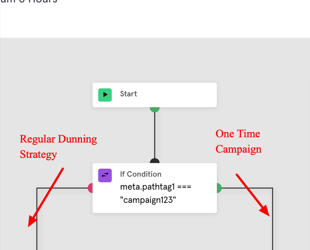
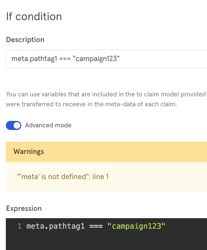
- You will upload new claims with a meta-property meta.pathtag1 = "campaign123"
- You have connected the campaign strategy via an IF step in the default strategy (See picture below)
- When you will upload claims with this special meta-property, they will automatically run through the campaign strategy
Step 3: Analyze Results
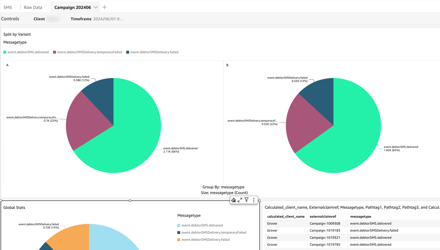
For effective analysis of your campaign results, examine key metrics such as delivery rates and click rates. By examining these metrics, you can extract valuable insights into the performance of your campaign, enabling you to make informed decisions for future strategies. Remember, thorough analysis is fundamental to refining your approach and maximizing the impact of your communication endeavors.
Step 4: Clean-up Data
Regardless of the upload method you have used, this procedure will generate campaign claims which are not to be considered as regular claims as per your existing dunning processes. This also applies in case an Account for the given debtor already existed. We recommend that after the campaign has been completed, and the results have been analyzed you either:
- Take the necessary steps to exclude these claims from any Analytics reporting (contact your Customer Success representative if you need support with that)
- Delete the claims and/or Accounts if necessary from receeve. This can be achieved with a of custom claim trigger reaction.