Integration Patterns
This document describes the integration patterns that we recommend to users when integrating with the platform. Here, we'll discuss the Client API and Webhooks.
Let's start with a diagram that summarizes the integration patterns:
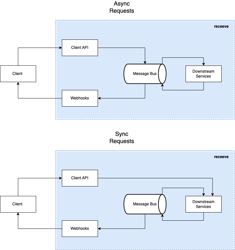
Any integration with the platform requires the following steps:
- Send information to the platform
- Request information from the platform
- Receive updates from the platform
The first two points are managed through the Client API, and the last one is managed through the Webhooks.
Client API
As a recap of what we described in the TL;DR; section:
- The API is organized around actions, not resources. For example, import_claims.
- The API uses JSON-encoded requests and responses when possible.
- The requests are always POST when the action produces a side-effect and GET when the action is a query.
- The Status Codes in the response indicate 3 main cases:
- The request is valid and was fully or partially processed (200). The response will include the result of the action, including any errors.
- The request is malformed or invalid (40X). This means the request is fully rejected without passing to the Downstream Services.
- The request was received and processed completely or partially, but there was an error in the platform (500). This type of error should not happen, but in the rare case it does, we’ll work immediately to fix the issue.
- The API actions are versioned. The version is included in the URL of the request. As a policy, we avoid breaking changes in the API at all costs. If we need to introduce breaking changes, we will introduce a new version of the action and preserve the old one for retro compatibility. Any major change in the API will be announced well in advance to all clients.
- All requests are required to be authenticated. Please refer to the Authentication Use Case for more details.
Request Types
The Client API supports 2 types of requests:
- Synchronous Requests: The client sends a request and waits for a response. Internally, the Client API Service will send the request to the Downstream Services and wait for the response. The client will then receive a response with the result of the action, including any errors.
- Asynchronous Requests: The client sends a request, and the platform processes it asynchronously. It is important to note that before adding the request to the Message Bus, we apply some validations to ensure the request is valid. If the request is not valid, the client will receive an error in the response immediately without creating any side-effect. If the request is valid, the system will send the request to the Message Bus and return immediately, without waiting for the response from Downstream Services.
Now, the most important question is how do you choose whether to use a Synchronous or Asynchronous request? We recommend using Asynchronous requests for all actions in which the order is not critical for your system’s operation (most cases), as they offer better performance and scalability.
There are a few cases where we recommend using Synchronous requests, including:
- When you need to ensure that the request was processed before continuing to the next step in your system.
- When you are testing the integration with the platform, as it is easier to debug errors when using Synchronous requests.
- When the number of requests is low, you can use either Synchronous or Asynchronous requests.
Notes:
- Regardless of the type of request, the Downstream Services will receive the request and send the Webhooks to the client.
- Any request that serves to retrieve information from the platform will be processed as a Synchronous request.
- The body of the response is the same for both types of requests; only the human-readable message is slightly different.
Webhooks
Webhooks are the key mechanism that the platform uses to notify your system about the most important events that happen on the platform. The Webhooks are sent to the URL that you provide in the configuration (using the Backoffice). The URL must be a valid HTTPS URL. All webhooks contain a signature field used to validate that the webhook was sent by the platform. The signature is generated using the HMAC-SHA256 algorithm.
All Webhooks are versioned, and the version is included in the payload. As mentioned earlier, as a policy we avoid breaking changes at all costs, and this applies to Webhooks. If we absolutely need to introduce breaking changes, we will introduce a new version of the webhook and keep the old one for retro compatibility. Any major change in the Webhooks will be announced in advance to all clients.
The payload of the webhook is a JSON object, and, depending on the type of webhook, it will contain different fields. Please refer to the Webhooks in Detail section for more details.
Webhooks are sent using the HTTP POST method. In case of an error, the platform will retry to send the webhook up to 5 times with exponential backoff.
FAQ
- What is the difference between the Client API and the Webhooks? The Client API is used to send information to the platform and request information from the platform. Webhooks are used to receive updates from the platform.
- What is the difference between a Synchronous and Asynchronous request? Synchronous requests wait for a response from the Downstream Services before returning the response to the client. Asynchronous requests return immediately without waiting for a response from the Downstream Services.
- How do I subscribe to Webhooks? Webhooks are sent to the URL (must be a valid HTTPS URL) that you provide in the configuration (using the Backoffice). To learn more about how to configure Webhooks, please refer to the Webhooks page.
- How do I validate the signature of the Webhooks? The signature is generated using the HMAC-SHA256 algorithm. To learn more about Webhooks, please refer to the Webhook Validation Use Case page.
- Are there limits to the number of requests that I can send to the platform? Yes, there are limits to the number of requests that you can send to the platform. These limits are related to each of the API Endpoints. To learn more about the limits, please refer to the API Documentation.